Covalent
A lightweight Java component model and runtime container.
Home | Previous: Neural Network Trainer - Architecture | Next: Rubik’s Cube Solver - Architecture
Table of Contents
- Top-Level Composites
- Functions Overview
- Per-Function Decomposition
- Raw Component: Stats Export
- HMI Assembly
This page is the architecture reference for the Ecosystem demo: every top-level composite, how they depend on one another, the interfaces shared between them, the internal MVIC decomposition of each function, and how the HMI is assembled from all of it. It complements the demo’s entry in the Examples Guide, which covers what the demo does and how to use it - this page is about how it is built.
Top-Level Composites
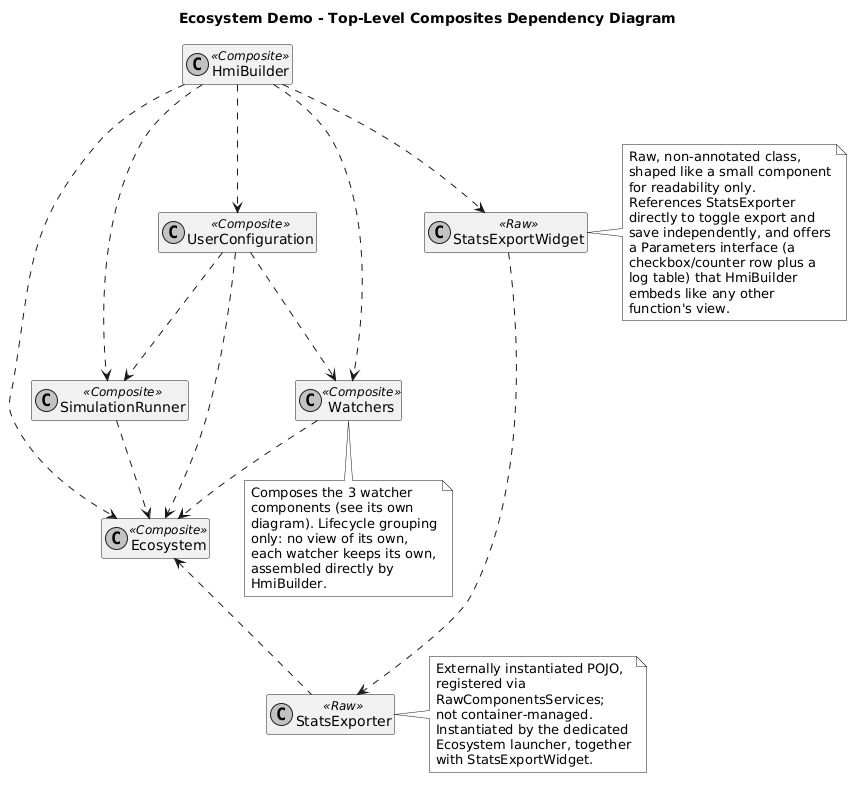
Five composites: Ecosystem, SimulationRunner, Watchers,
UserConfiguration and HmiBuilder. These five are each a function’s own
composite, at the top of its own MVIC - not the application’s root; the
actual root composite is EcosystemDemoImpl, the only class passed to
container.deployComponents(...), with every field activated in
declaration order: the HMI core first, then Ecosystem (owns the species
state and the simulation step), SimulationRunner (paces it), Watchers,
UserConfiguration, and HmiBuilder last, which reads every other
function’s already-built view.
Watchers is a plain @Implementation with no Services, Parameters or
Events of its own - three more @Implementation fields
(RoleWatcher, WatchlistWatcher, CrossWatcher) and nothing else. It
exists purely to group their lifecycle under one parent, so
EcosystemDemoImpl activates and passivates all three together without
listing each one itself. Composition
needs nothing extra to support this: a composite can contain composites
just as readily as it contains a Model or a View, so nesting one more
level costs nothing beyond declaring one more field - which is exactly
why “top-level composite” rather than “root component” is the right name
for Ecosystem, SimulationRunner, Watchers, UserConfiguration and
HmiBuilder: RoleWatcher, WatchlistWatcher and CrossWatcher are
composites too, just not top-level ones.
A StatsExporter/StatsExportWidget raw component pair sits alongside
these five, wired by the demo’s own launcher rather than
deployComponents(...) - see Raw Component: Stats
Export below.
Functions Overview
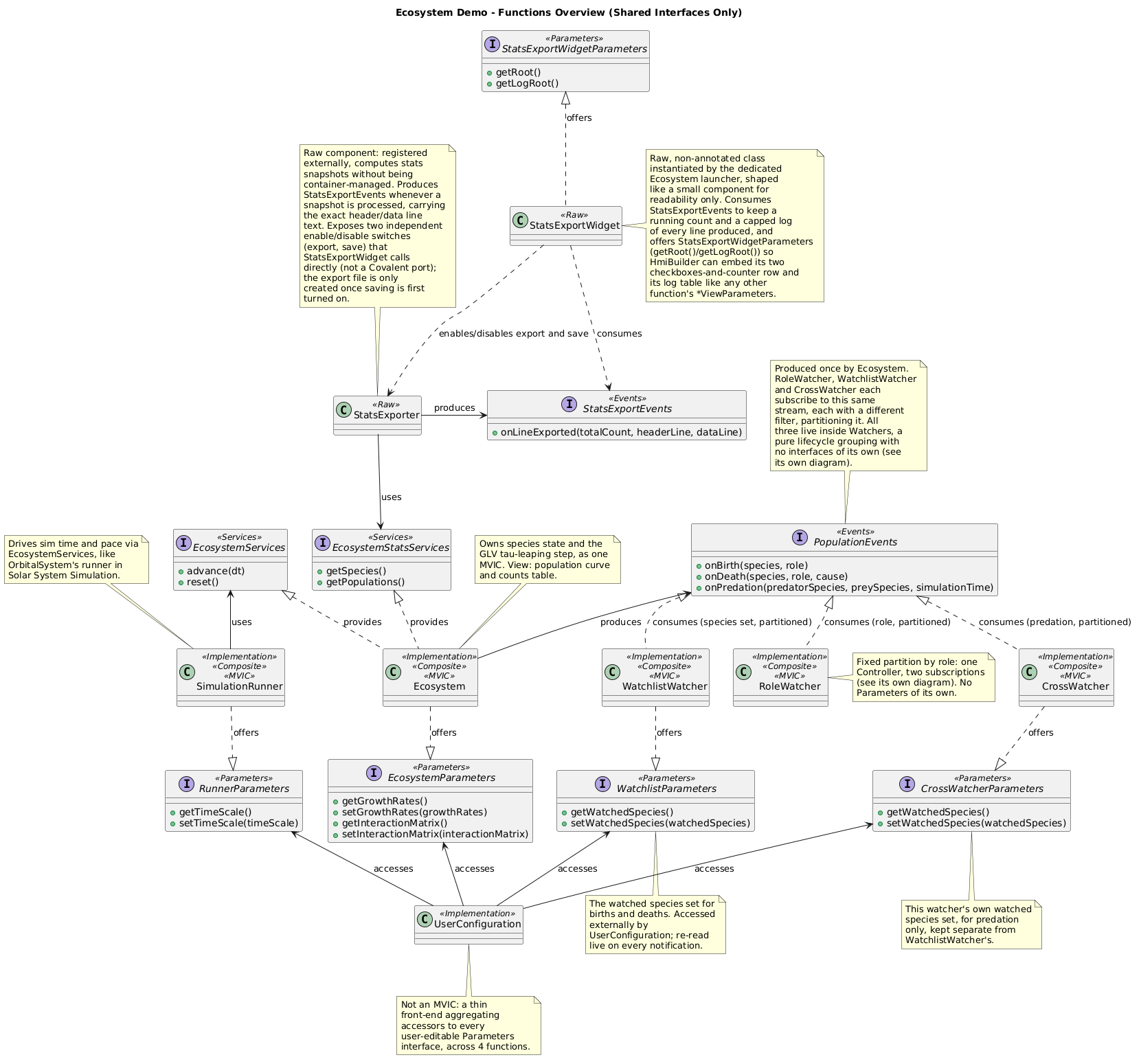
One interface does almost all of the cross-function work:
PopulationEvents, produced once by Ecosystem and consumed
independently by all three components inside Watchers, each with its
own filter - the same
broadcast stream partitioned three different ways, without any watcher
sorting events itself in its own callback. EcosystemServices (called
every tick by SimulationRunner) and the four *Parameters interfaces
UserConfiguration accesses round out the rest; RoleWatcher is the one
function with no Parameters of its own, since both of its filters are
fixed rather than user-editable.
Ecosystem’s Model also exposes EcosystemStatsServices
(getSpecies(), getPopulations()) as a second, read-only interface
alongside the state-mutating EcosystemModelServices the Controller
uses - deliberately public and separate, the shape the raw StatsExporter
component (see Raw Component: Stats Export
below) consumes to read live population data without ever touching the
simulation itself.
Per-Function Decomposition
Each function below is shown as its own MVIC, with full interface method signatures, plus the public interfaces it exposes to or consumes from the rest of the demo.
Ecosystem
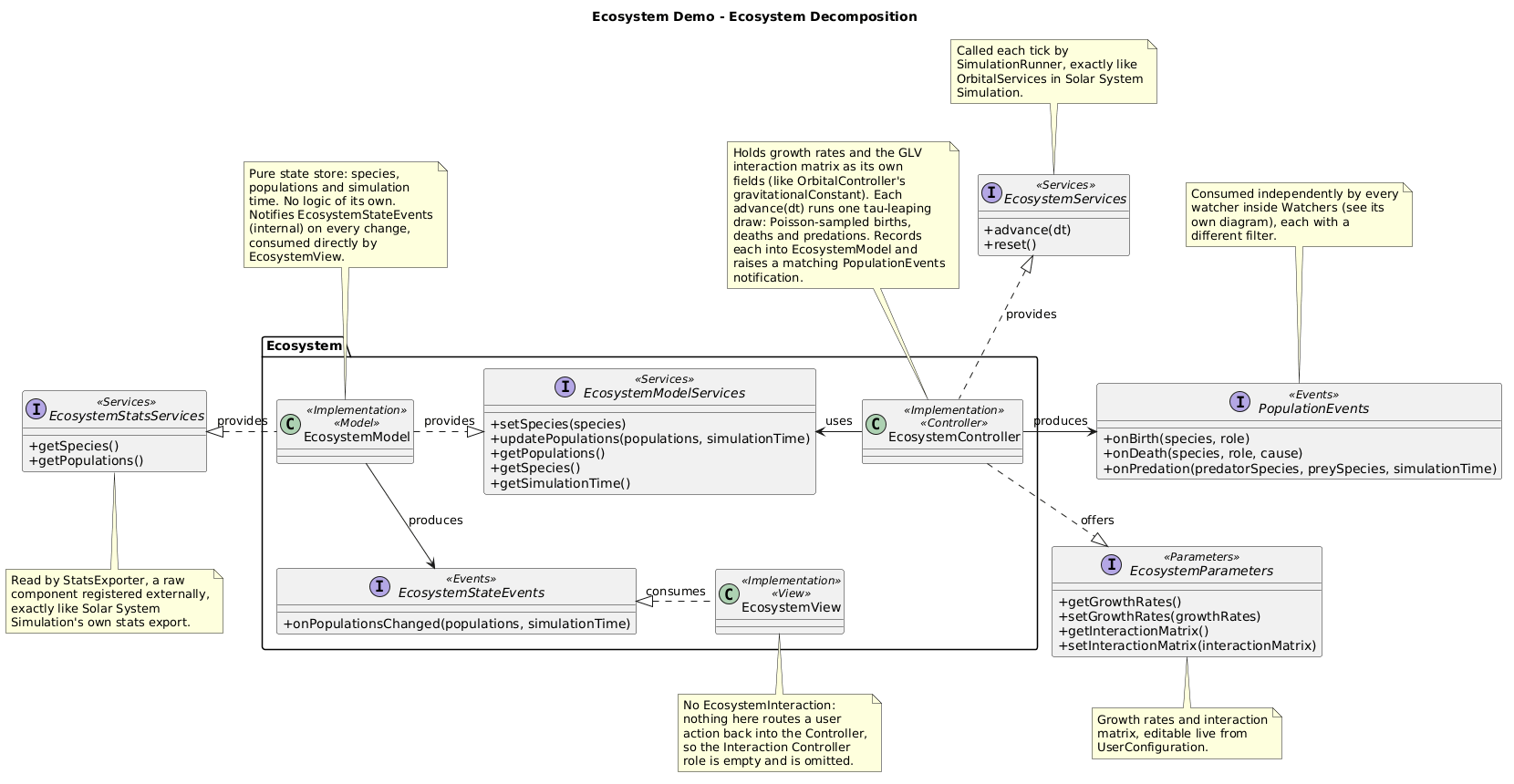
Owns species populations and the simulation step, as one MVIC - Model
and View only, no Interaction Controller, since nothing here routes a user
action back into the Controller. The Controller holds growth rates and a
generalized Lotka-Volterra interaction matrix as its own fields, and runs
one stochastic tau-leaping draw per advance(dt): a Poisson-sampled
birth or death for each species, each recorded into the Model and raised
as a matching PopulationEvents notification.
double lambda = Math.abs(netRate) * n * dt;
int count = poisson(lambda);
if (netRate >= 0.0) {
    nextPopulations.put(name, n + count);
    populationEvents.onBirth(name, s.role());
} else {
    double after = Math.max(0.0, n - count);
    nextPopulations.put(name, after);
    populationEvents.onDeath(name, s.role(), cause);
    firePredationIfApplicable(s, row);
}
Every non-Grass species starts with a negative baseline growth rate:
a Prey or Predator declines and eventually starves on its own, and
only turns net-positive through its interaction-matrix coefficient with
whatever it eats - without this, a species would keep growing even after
its own food source goes extinct.
Filtered subscription requires PopulationEvents to declare a subscribe
interface, PopulationEventsSubscribe, which each watcher consumes. The
container provides it: EcosystemControllerImpl does not implement it, as
it has no need to be told about its subscribers. Nothing needs catching up
there: Watchers’ three components all activate before Ecosystem ever
produces a first event.
Between the Model and the View, EcosystemStateEvents is the opposite
case. The View subscribes manually, through EcosystemStateEventsSubscribe,
so that its “Pause display” checkbox can stop and resume its reception
while the simulation keeps running. The subscribe call carries two custom
arguments, neither a filter nor subscribe parameters: the simulation time
of the last state the View has, and the “History depth” it wants back
(entered in the field next to the checkbox):
this.useStateEventsSubscribe.subscribe(this, this.subscribedSince, this.subscribedDepth);
EcosystemModelImpl implements the subscribe interface, so it is told
about each subscription (event subscription
delegation).
It keeps a bounded history of the states it notified, and replays to the
new subscriber those after the given time, at most the latest historyDepth
of them: a long enough depth completes the curve at once, a short one
leaves a visible jump across the older missed part. The arguments identify
the subscription, so unsubscribe repeats them (see Custom Event
Subscription).
The pause involves no action: it only concerns this View, which handles it
itself.
SimulationRunner
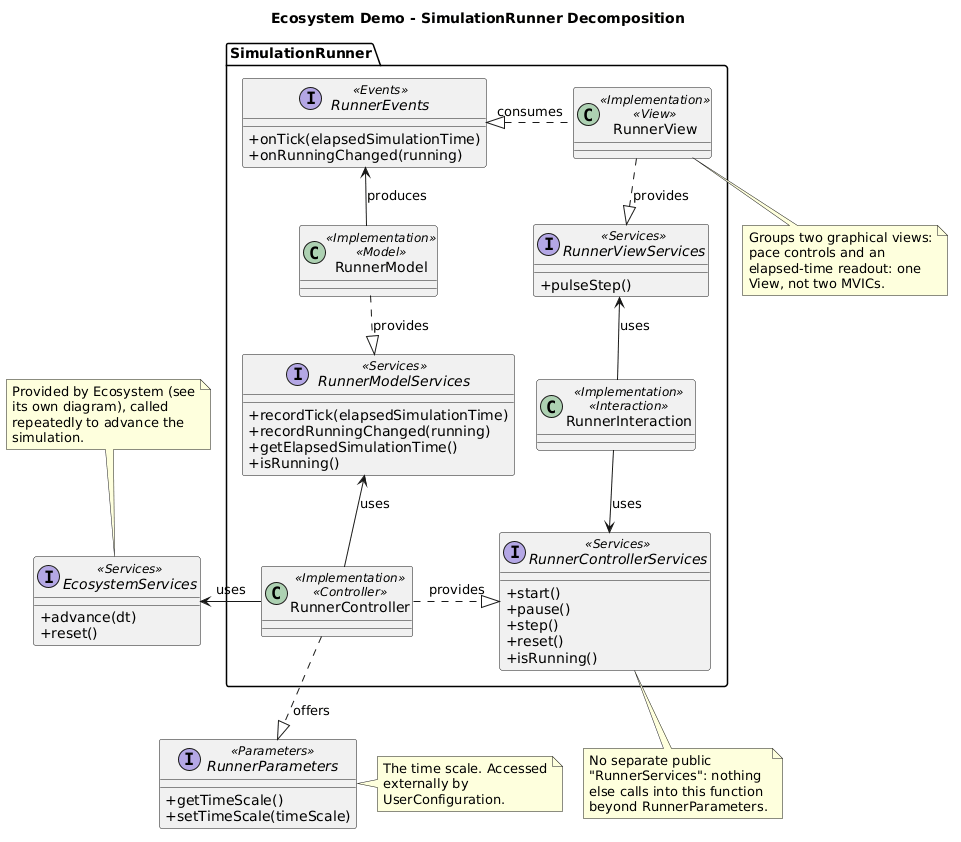
Paces the simulation independently of Ecosystem’s own logic, exactly
as SimulationRunner does in Solar System Simulation: its Controller
drives ticks from its own dedicated ScheduledExecutorService (a fixed
50 ms pause between ticks, about 20 ticks per second), the same
scheduled-executor shape TrainingControllerImpl uses in the neural network demo. Each tick
scales a fixed simulation-time step by the live, user-editable
RunnerParameters.getTimeScale() and calls EcosystemServices.advance(dt).
The View groups two graphical views - run controls and an elapsed-time
readout - as one View, not two MVICs; a manual “Step” additionally
flashes the readout through RunnerViewServices.pulseStep(), visual
feedback a continuously-running tick doesn’t need.
Watchers
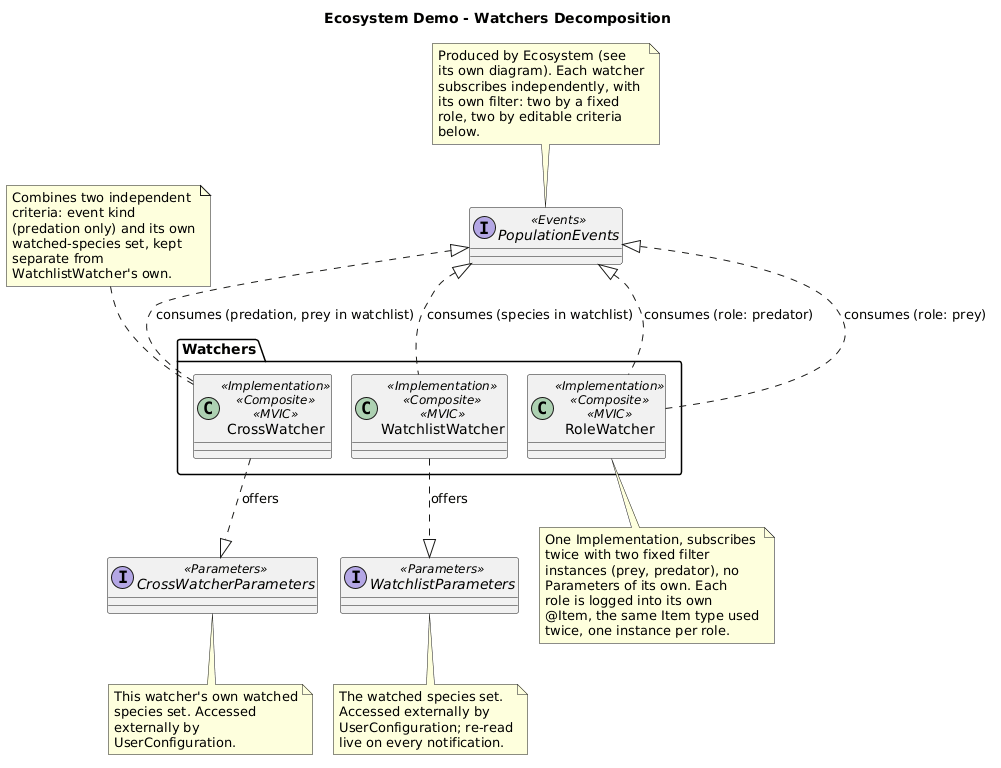
The lifecycle-only composite from Top-Level
Composites above, shown here with its three
children’s boundary interfaces. Each one subscribes to the same
PopulationEvents stream produced by Ecosystem, with a filter that
picks out a disjoint (or, for CrossWatcher, cross-cutting) slice of
it - the three together are what turn one broadcast into three
differently-scoped views without Ecosystem knowing any of them exist.
HmiBuilder bypasses this composite entirely: each child’s View is
embedded directly (see HMI Assembly below), so grouping
them here is purely a lifecycle convenience, never a routing concern.
RoleWatcher
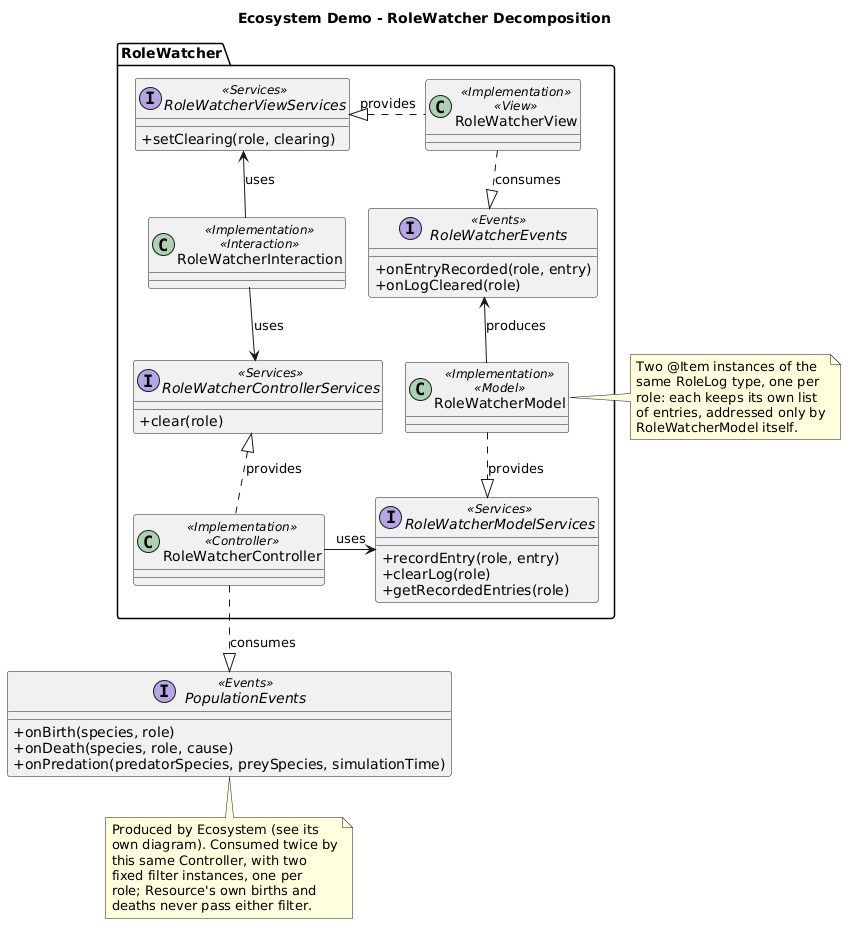
One Controller, two independent subscriptions to the same
PopulationEvents, each combining a filter with
subscribing an object instead of the consumer
component:
@Activation
public void subscribeBothRoles() {
    populationEventsSubscribe.subscribe(preyObserver, new RoleFilter(Role.PREY));
    populationEventsSubscribe.subscribe(predatorObserver, new RoleFilter(Role.PREDATOR));
}
preyObserver and predatorObserver are two small delegate instances of
a private inner class holding one fixed Role each, so the Controller’s
own onBirth/onDeath never has to branch on which role a notification
belongs to - each delegate already knows. The architecture diagram still
shows one consumes edge: which Java object actually receives a given
callback is an implementation detail beneath that abstraction. The Model
mirrors this split with two @Item fields, preyLog and predatorLog -
necessarily two distinct item types (PreyLogItem, PredatorLogItem)
rather than one type used twice, since Covalent resolves an @Item field
by its declared type and two fields of the same type on one
@Implementation would collide.
WatchlistWatcher
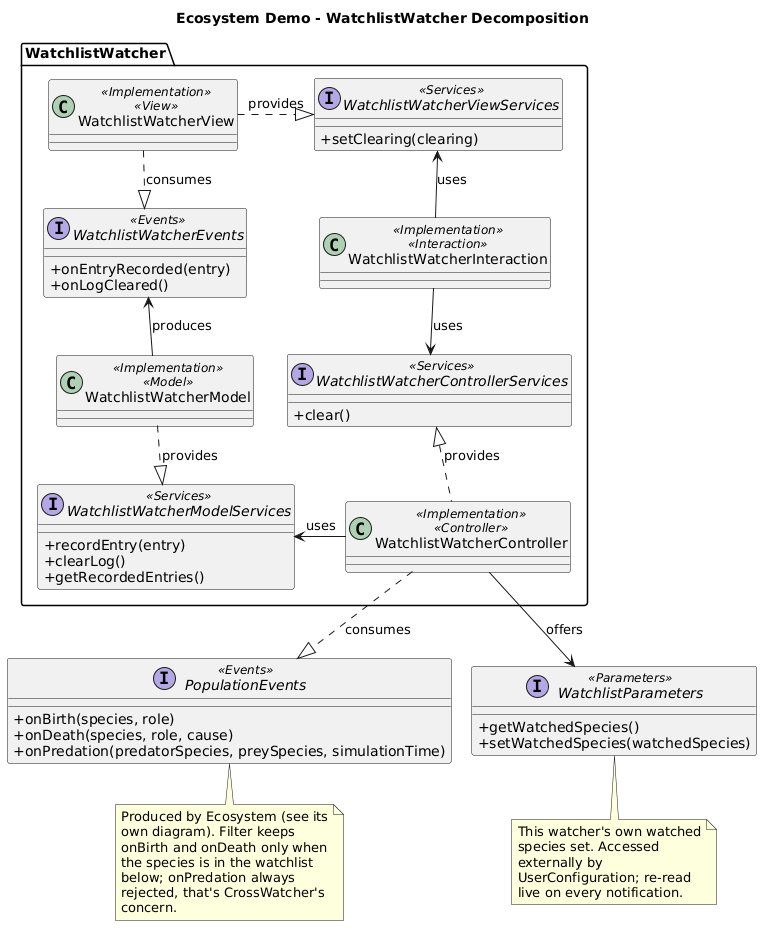
Subscribes itself directly, with a filter that reads this function’s own
live WatchlistParameters on every notification - the same shape
HazardAlertControllerImpl uses in Solar System Simulation, so editing
the watched-species set from UserConfiguration changes what qualifies
from the next notification on, with no re-subscription needed.
CrossWatcher
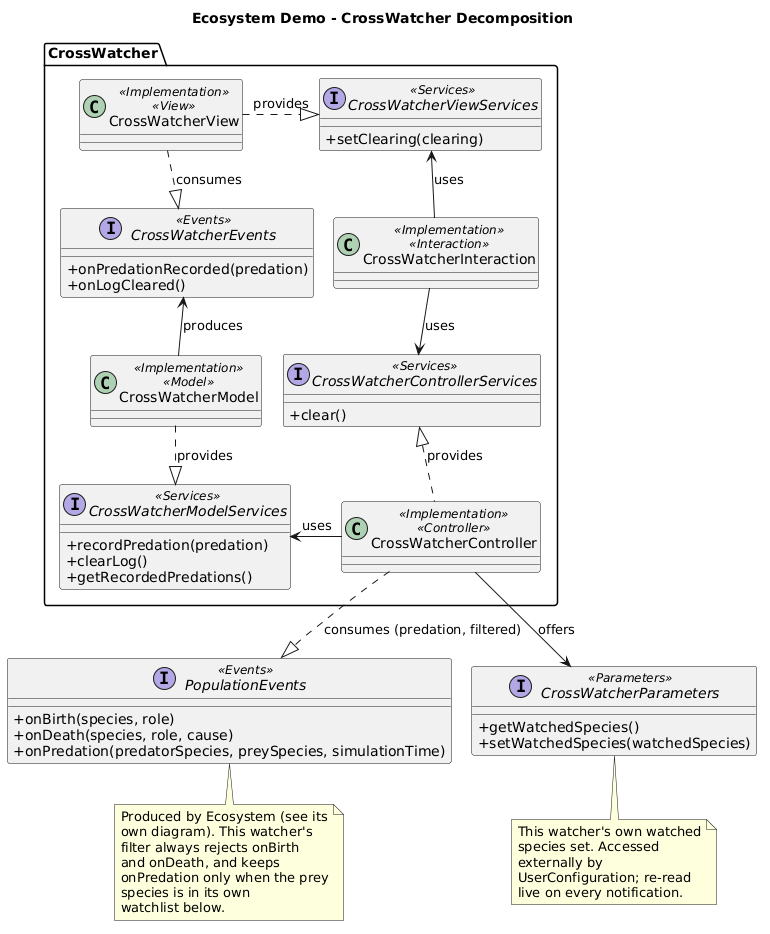
The one filter combining two independent criteria at once: event kind
(onPredation only - births and deaths are always filtered out) and,
within that, whether the prey species is in this function’s own watched
set, kept deliberately separate from WatchlistWatcher’s own set of the
same shape. Two filter methods returning an unconditional true is what
expresses “not this watcher’s concern” for an entire event kind, as
plainly as the third method’s real condition expresses it for the one
kind this watcher does care about.
Raw Component: Stats Export
A raw component pair, StatsExporter and
StatsExportWidget, mirrors the running population counts to a CSV file
from entirely outside the managed component graph: neither class carries
@Component or @Implementation, and neither is passed to
deployComponents(...). Both are wired instead by
EcosystemStatsExportDemoLauncher, this demo’s own DemoLauncher, which
the shared multi-demo launcher uses for the Ecosystem row in place of the
ordinary ManagedDemoLauncher every other demo uses.
StatsExporter uses
EcosystemStatsServices from the outside, through two independent
switches rather than one: setExportEnabled(boolean) turns computing one
population snapshot a second - and logging it - on or off, and
setSaveEnabled(boolean) separately turns persisting those same snapshots
to a CSV file on or off:
private void tick() {
    if (!this.exportEnabled) {
        return;
    }
    List<Species> species = this.useEcosystemStatsServices.getSpecies();
    Map<String, Double> populations = this.useEcosystemStatsServices.getPopulations();

    boolean headerIsNew = this.headerText == null;
    if (headerIsNew) {
        this.headerText = species.stream().map(Species::name).collect(Collectors.joining(","));
    }
    String dataText = species.stream().map(s -> String.valueOf(populations.getOrDefault(s.name(), 0.0)))
            .collect(Collectors.joining(","));

    if (this.saveEnabled) {
        try {
            this.appendToFile(dataText);
        } catch (IOException e) {
            throw new UncheckedIOException(e);
        }
    }

    this.totalCount++;
    this.producedEvents.onLineExported(this.totalCount, headerIsNew ? this.headerText : null, dataText);
}
The export file itself is only ever created the first time saving turns
on, never merely because export is enabled - a user who only watches the
log never gets a file on disk they did not ask for. StatsExporter
produces a raw
StatsExportEvents.onLineExported(int totalCount, String headerLine, String dataLine)
notification on every tick, carrying the exact header and data line text -
headerLine is non-null only the first time it is produced - so a raw
consumer can display a verbatim running log without reading the export
file back off disk.
StatsExportWidget is the raw counterpart on the consuming side: it
subscribes to
StatsExportEvents to keep a running line count and a log of every header
and data line produced, capped at 200 rows, holds a plain object reference
to StatsExporter to flip its two switches directly (a raw component
calling another raw component needs no Covalent port at all), and
offers
StatsExportWidgetParameters the same way every managed function’s own
View offers its *ViewParameters - two accessors, getRoot() for the
checkbox-and-counter row and getLogRoot() for the log table, so
HmiBuilder embeds both through the ordinary @AccessedParameters +
getXxxRoot() pattern without knowing its offeror is raw.
Wiring order is what makes this work, and EcosystemStatsExportDemoLauncher
owns it entirely - LauncherApplication itself never imports anything
Ecosystem-specific: the widget registers and offers its parameters first,
so HmiBuilder resolves it like any other *ViewParameters once it
activates; the managed EcosystemDemoImpl composite then deploys and
starts; only once Ecosystem has activated and published
EcosystemStatsServices does StatsExporter register and start pulling
from it. A flat list of @Implementation classes handed to
deployComponents(...) cannot express this sequencing, which is exactly
why this demo needs its own DemoLauncher rather than the shared
launcher’s ordinary one.
A Deliberate Dependency Cycle
The Supervisor’s dependency graph reports one cycle in this demo, and it is a real one:
StatsExportWidgetdepends onStatsExporter: it consumesStatsExportEvents.StatsExporterdepends onEcosystemDemo: it usesEcosystemStatsServices, provided byEcosysteminside it.EcosystemDemodepends onStatsExportWidget:HmiBuilder, inside it, accessesStatsExportWidgetParameters.
Dependencies are analyzed between top-level components, and a composite
stands for everything it contains. The two raw components cannot be
composed into EcosystemDemo, so they sit beside it at the top level,
and the dependencies running into and out of the composite close the loop.
Taken component by component, the chain itself is linear: HmiBuilder
→ StatsExportWidget → StatsExporter → Ecosystem.
The demo still runs, because the launcher orders the wiring by hand (see above) and a used port waits on a surrogate until its provider appears.
The fix would be to turn both raw components into managed components and
compose them into EcosystemDemo: there would then be a single top-level
component, and its children would only form a linear chain. The cycle is
kept on purpose, since this pair exists to show raw components in use,
and it also shows what the cycle detection reports when components
outside a composite depend on it in both directions.
HMI Assembly
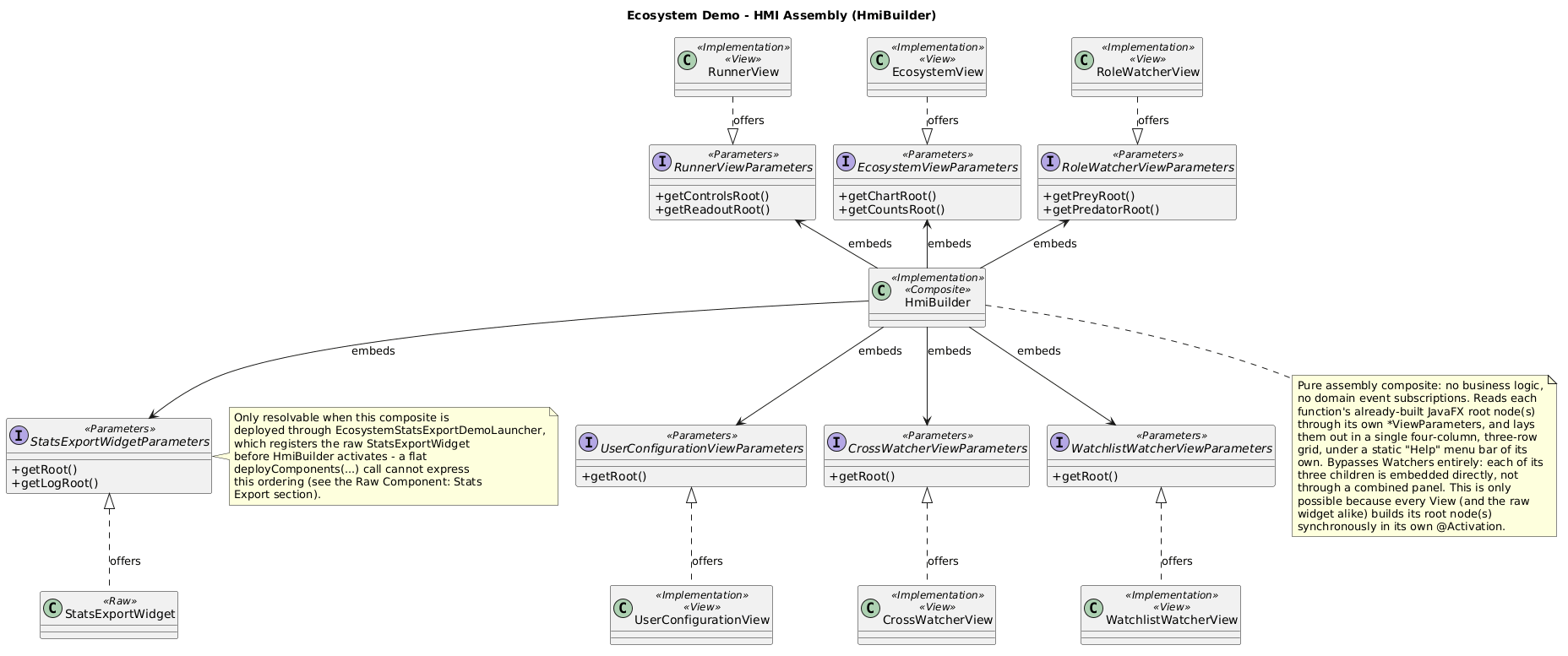
HmiBuilder reads seven *ViewParameters interfaces -
Ecosystem, SimulationRunner, UserConfiguration, each of the three
watchers individually, and the raw StatsExportWidgetParameters - laid
out in a grid of three columns and one row. The left column holds the
configuration and the runner controls. The center column holds the
population chart, which takes the spare height, above the population counts
table and the elapsed-time readout. The right column holds the watchlist
table, the prey log, the predator log and the cross-watcher table, followed
by the stats export widget’s two nodes stacked - getRoot() above
getLogRoot(). EcosystemViewParameters offers two separate root nodes,
getChartRoot() and getCountsRoot(), for the same reason
RunnerViewParameters splits into getControlsRoot() and
getReadoutRoot().
The grid’s own width is pinned at the lesser of 1920 pixels and the
screen’s visual width, with the center column’s minimum width pinned at
zero: left at its default, a column’s minimum is derived from its children’s
natural size and could otherwise force the grid wider than the cap - the
population chart is exactly the kind of child that would do this. With the
center column free to shrink, each table still fills its own cell at full
width through its own CONSTRAINED_RESIZE_POLICY,
so nothing in this assembly ever renders wider than the window actually
is.
As in the other demos, this composite is otherwise pure assembly - no
business logic, no domain event subscriptions - and only works because
every View (and the raw widget alike) builds its root node(s)
synchronously, before HmiBuilder activates and reads these parameters;
StatsExportWidgetParameters is only resolvable here because
EcosystemStatsExportDemoLauncher registers the widget before the
managed composite deploys, exactly as the previous section describes.
HmiBuilder also wires one piece of code of its own, beyond assembly: a
static “Help” menu bar, with an “About Ecosystem Demo” entry summarizing
what the demo does and which Covalent mechanisms it illustrates, and a
“Using Ecosystem Demo” entry describing its controls - each opening a
small, non-modal, read-only text window, wired directly rather than
through ActionConsumerServices, exactly as in the other three demos
(see Neural Network Trainer -
Architecture).
Ecosystem has no “View” menu of its own - that addition is specific to
Solar System Simulation’s dark/light theme switch (see Solar System
Simulation - Architecture).
Home | Previous: Neural Network Trainer - Architecture | Next: Rubik’s Cube Solver - Architecture