Covalent
A lightweight Java component model and runtime container.

Covalent


A lightweight Java component model and runtime container.
As a Java application grows, the class stops being a unit its architecture can be reasoned about with: there end up being too many of them, wired together by hand, for the shape of the system to stay visible in the code. What is needed at that point is a coarser, more structuring unit to build around - the component.
A component still talks to other components the way ordinary Java objects do - by calling methods - but through a declared service rather than a direct reference to another object’s implementation. That one change is a real refinement over plain object programming: what a component offers and what it needs become visible in its interfaces, not buried inside its code, and a container can act on that visibility.
Acting on it is the other half of the idea. A component delegates to the container what would otherwise be threaded by hand through the whole application: finding a collaborator, starting and stopping it in the right order, reacting when it fails, holding its configuration. Covalent is that container: a lightweight component model and runtime for a single JVM process, keeping dependency injection, event subscriptions, lifecycle callbacks and configuration (and many others features) out of business code and into the container itself.
| Java 21 | MPL-2.0 | core with no third-party runtime dependency |
Status: 1.0.0. No artifact is published; install from source (see Using Covalent). Issues are open for bugs and questions.
Documentation: Tutorial · User Guide · Examples · Supervision · Troubleshooting · FAQ - see Where To Go Next below for what each one covers.
Why Covalent
- Sophisticated events. Each subscriber can use its own filter, producers can be told about new subscribers, event data can be cloned automatically, and dispatch is asynchronous by default.
- Components at two scales. Composition organizes an application as a tree of components; items segment the implementation of a single component.
- Parameters as ports. Configuration is exposed through typed interfaces with their own lifecycle timing, available from the initialization of a component.
- A robust container. Each component goes through a managed lifecycle - deployment, instantiation, initialization, activation, passivation, removal and undeployment - and its provided ports are usable by others only while it is activated. Lifecycle failures are contained and reported, and every startup and shutdown returns a report. See Lifecycle.
- A container you can see. The component viewer lets you inspect a running container.
- Progressive adoption. Existing Java objects can join the runtime as raw components, while new code uses fully managed components.
The goal is not to hide architecture behind magic, but to make component boundaries, ports, and lifecycle explicit enough for large applications to stay understandable as they grow. If you are weighing Covalent against Spring, Guice or OSGi, see Compared To Other Approaches.
Getting Started
This example declares three components: Orders provides a service to place an
order and produces an event each time it does; Kitchen subscribes to that event
with a filter, so it only hears about the orders it cares about; Application
drives the service. No component knows about the others beyond the interfaces
they share.
import org.opales.covalent.Covalent;
import org.opales.covalent.container.CovalentContainer;
import org.opales.covalent.container.component.annotations.Component;
import org.opales.covalent.container.component.annotations.Events;
import org.opales.covalent.container.component.annotations.EventsFilter;
import org.opales.covalent.container.component.annotations.EventsSubscribe;
import org.opales.covalent.container.component.annotations.Implementation;
import org.opales.covalent.container.component.annotations.ProducedEvents;
import org.opales.covalent.container.component.annotations.Services;
import org.opales.covalent.container.component.annotations.UsedEventsSubscribe;
import org.opales.covalent.container.component.annotations.UsedServices;
import org.opales.covalent.container.lifecycle.Activation;

public final class Launcher {

    @Component
    public interface Orders { }

    @Services
    public interface OrderServices {
        void placeOrder(String product, int quantity);
    }

    @Events
    public interface OrderEvents {
        void onOrderPlaced(String product, int quantity);

        @EventsSubscribe
        interface OrderEventsSubscribe {
            void subscribe(OrderEvents observer, OrderEventsFilter filter);
        }

        @EventsFilter
        interface OrderEventsFilter {
            boolean filterOrderPlaced(String product, int quantity); // true = filtered out
        }
    }

    @Implementation
    public static final class OrdersImpl implements Orders, OrderServices {
        @ProducedEvents private OrderEvents produceOrderEvents;
        public void placeOrder(final String product, final int quantity) {
            this.produceOrderEvents.onOrderPlaced(product, quantity);
        }
    }

    @Component
    public interface Kitchen { }

    @Implementation
    public static final class KitchenImpl implements Kitchen, OrderEvents {
        @UsedEventsSubscribe private OrderEvents.OrderEventsSubscribe useOrderEventsSubscribe;

        @Activation
        public void subscribeToCroissants() {
            this.useOrderEventsSubscribe.subscribe(this, new CroissantsOnly());
        }

        public void onOrderPlaced(final String product, final int quantity) {
            System.out.println("Kitchen: preparing " + quantity + " x " + product);
        }

        private static final class CroissantsOnly implements OrderEventsFilter {
            public boolean filterOrderPlaced(final String product, final int quantity) {
                return !"croissant".equals(product);
            }
        }
    }

    @Component
    public interface Application { }

    @Implementation
    public static final class ApplicationImpl implements Application {
        @UsedServices private OrderServices useOrderServices;
        @Activation public void run() {
            this.useOrderServices.placeOrder("coffee", 2);
            this.useOrderServices.placeOrder("croissant", 1);
        }
    }

    public static void main(final String[] args) {
        CovalentContainer container = Covalent.main;
        container.getParameters().setSynchronousEvents(true);
        try {
            container.deployComponents(OrdersImpl.class, KitchenImpl.class, ApplicationImpl.class);
            container.start();
        } finally {
            if (container.isStarted()) {
                container.stop();
            }
        }
    }
}
Running it prints Kitchen: preparing 1 x croissant: the coffee order is placed
too, but Kitchen filtered it out before it ever reached onOrderPlaced. See the
tutorial for the full walk-through, one idea at a time,
starting from an even smaller first component.
How The Example Fits Together
The components of the example above are connected through ports rather than through each other directly:
graph LR
    Application -->|uses OrderServices| Orders
    Orders -->|produces OrderEvents| Kitchen
    Kitchen -.->|subscribes, with a filter| Orders

    classDef component fill:#eef,stroke:#33a,stroke-width:1px;
    class Application,Orders,Kitchen component;
Application only knows the OrderServices interface, never the Orders
component’s implementation; Orders only knows that some interfaces exist to
produce, never who (if anyone) subscribes. Kitchen’s filter (shown in the
example above) is why it only ever sees the croissant order,
not the coffee one. See Lifecycle for the
states a component goes through between deployment and undeployment.
Component Viewer
Enable the component viewer, an optional extension provided by the
covalent-supervision module, with:
-Dcovalent.extensions=component-viewer
The viewer stays out of the way until it is needed, even on an application that is already
running: press Ctrl+Shift+F12 in a window of the application, or
call the openSupervisor operation of the org.opales.covalent:type=Supervision MBean from
JConsole or VisualVM. See Summoning the Supervisor.
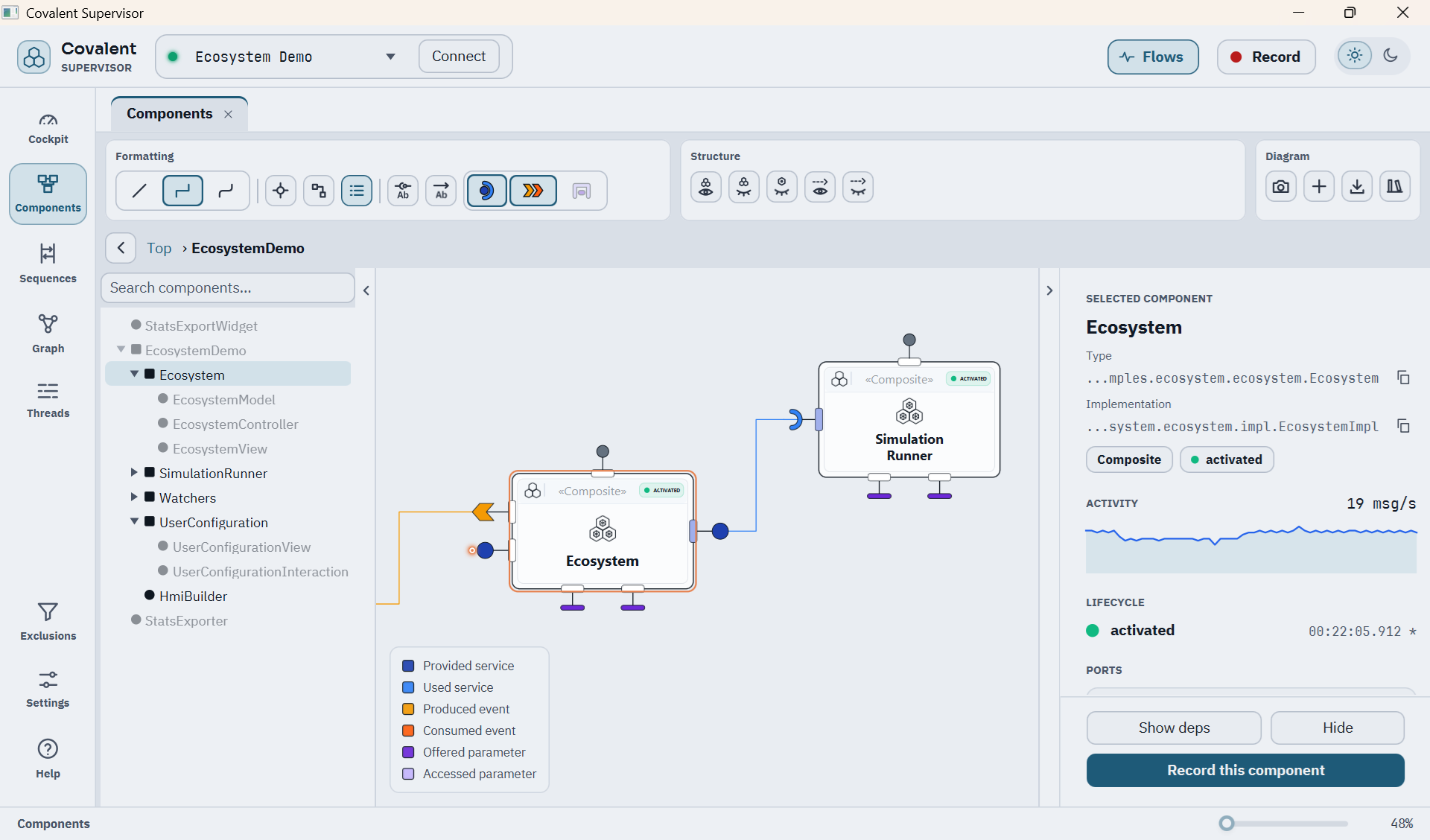
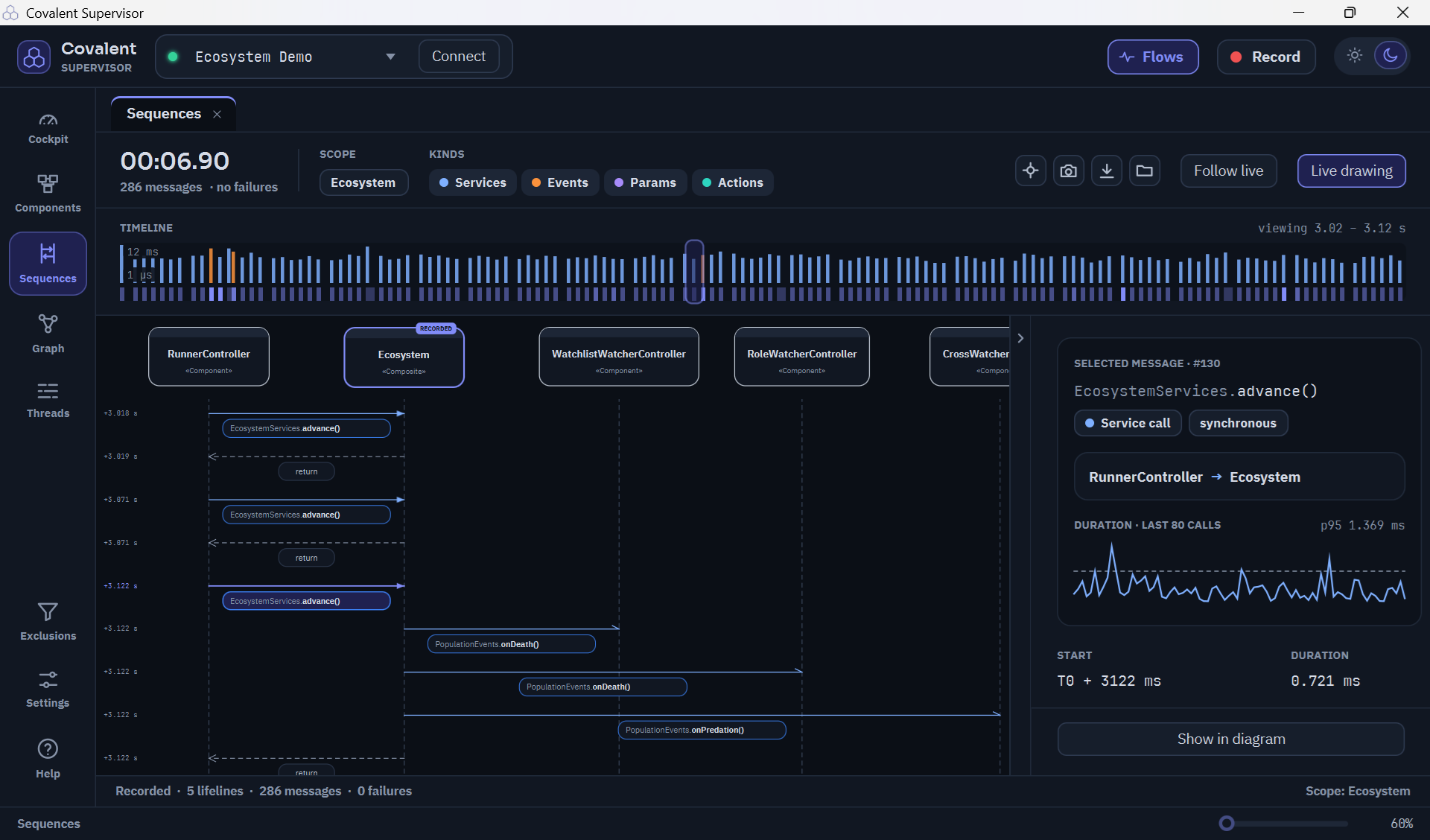
The viewer also records the calls and events exchanged between components, and shows them as a sequence diagram with the details of each message:
See the Covalent Supervision Guide for what else
covalent-supervision provides, and for writing a custom extension of your
own.
Using Covalent
As A Dependency
No release of Covalent is published to a Maven repository. Install it to your local repository from source:
git clone https://github.com/opales-org/covalent.git
cd covalent
mvn -pl covalent-core -am install
-am also builds and installs the parent POM that covalent-core inherits from;
without it, an external project fails to resolve covalent-parent even though
covalent-core itself installed successfully. Then declare the dependency in
your own project:
<dependency>
    <groupId>org.opales</groupId>
    <artifactId>covalent-core</artifactId>
    <version>1.0.0</version>
</dependency>
Covalent uses reflection and runs in the unnamed module: put it on the classpath, not the module path. See Runtime Requirements and Compatibility.
Building And Testing The Repository
Build the repository, run every test and check the Javadoc with the Maven
Wrapper (mvnw / mvnw.cmd at the repository root), on Windows:
.\mvnw clean verify
or on Linux and macOS:
./mvnw clean verify
The wrapper downloads and pins the project’s expected Maven version on first
use, so no pre-installed Maven is needed. A Java 21 JDK is still required on
the PATH or via JAVA_HOME.
See Build and Tests for the module breakdown and the core-only build command.
Where To Go Next
- Tutorial: a step-by-step introduction with runnable examples, from your first component to events, lifecycle and composition.
- User guide: the reference documentation, with the concepts, managed and raw components, annotations, configuration and glossary.
- Examples: four runnable JavaFX applications built on Covalent, with a capability matrix and a chapter per demo.
- Troubleshooting: common symptoms and the first checks to make.
- FAQ: adopting Covalent (Java version, JavaFX, JPMS, stability), using it (thread-safety, event delivery, testing, the supervisor’s cost) and its license.
License
Covalent is released under the Mozilla Public License 2.0. The Covalent name and logo are not covered by that license. The FAQ answers the usual questions about what it allows.